New Feature: edit building surface area directly.

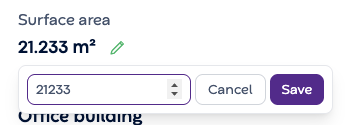
Spot a wrong area (m²) in your building? You can now edit the surface area of your buildings straight from the Building page yourself.
How it works:
Spot a wrong value or need to make a change? Hit the pencil icon, type the correct number, and save. That's it!
What this means for you:
No more jumping between systems to request a data fix
Make changes instantly, without relying on anyone else
Run calculations on accurate, up-to-date floor area data
Why it matters for your portfolio:
Accurate area (m²) start flows in your building analytics, benchmarks, and cost calculations. One wrong number quietly breaks a lot of things downstream. Now you can fix it the moment you spot it.
Where to find it:
Building View → Surface Area
Give it a try and let us know what you think